Industrial product identification is critical for traceability, compliance, and brand protection. From expiry dates to…
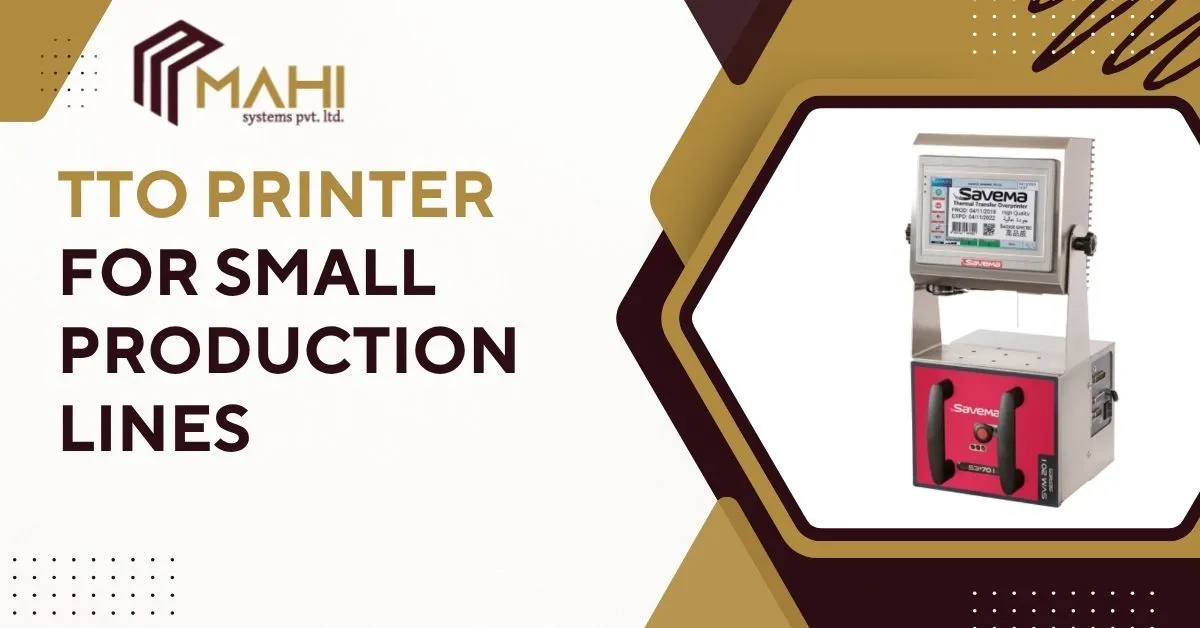
A TTO printers (Thermal Transfer Overprinter) is one of the most efficient and reliable solutions for printing variable data such as expiration dates, barcodes, and batch codes directly onto flexible packaging. For small production lines, a TTO printer offers high-quality printing, lower operating costs, and seamless integration with form-fill-seal machines.
In this comprehensive guide, you’ll learn everything about TTO printers — how they work, their benefits, features to look for, comparisons with other printing technologies, and how to choose the best TTO printer for your small-scale manufacturing setup.
How Does a TTO Printer Work?
A TTO printers uses a printhead equipped with heating elements to melt ink from a thermal transfer ribbon and press it onto the packaging film.
Here’s a simple breakdown of the process:
1. The ribbon — coated with ink — moves between the printhead and the substrate.
2. The printhead heats up selected dots based on the data being printed.
3. The ink transfers to the packaging film, producing durable, high-contrast text or barcodes.
This process ensures precise, permanent printing on flexible materials like polypropylene, polyester, and laminated films — ideal for food, pharmaceuticals, and cosmetics.
Benefits of Using a TTO Printer for Small Production Lines
A TTO printers offers numerous advantages for businesses with limited space and moderate output needs.
Key Benefits:
- Exceptional print quality: Produces sharp, scannable barcodes and clear expiry dates.
- Cost-efficient operation: Ribbons are inexpensive compared to inkjet inks or labels.
- Low maintenance: No ink cartridges or solvents reduce service requirements.
- Compact design: A TTO printer easily fits on existing packaging equipment.
- Environmentally friendly: No solvent waste, minimal consumable usage.
- Reliable for 24/7 operation: Perfect for continuous packaging lines.
For small manufacturers, the TTO printer provides a balance of speed, quality, and long-term savings.
Key Features to Look for in a TTO Printer
Before purchasing a TTO printers, evaluate its technical features to ensure compatibility with your production line.
Important TTO Printer Features:
- Print resolution: Typically 300 dpi for clear, durable codes.
- Print area: Choose according to your film width (common options are 32 mm, 53 mm, or 107 mm).
- Ribbon economy mode: Saves ribbon by reducing unused areas.
- Print speed: Match printer speed to packaging line speed for synchronization.
- Connectivity options: Ethernet, USB, and industrial I/O for easy integration.
- User interface: Touchscreen or PC-based software for intuitive operation.
- Ribbon cassette system: Quick-change design minimizes downtime.
A well-chosen TTO printer ensures consistent performance, reduced costs, and easy integration into your existing setup.
TTO Printer vs Other Coding Technologies
Wondering how a TTO printers compares with inkjet or label printing systems? Here’s a quick comparison:
| Feature | TTO Printer | CIJ (Continuous Inkjet) | Label Printer |
| Print Quality | High (300 dpi) | Moderate (120 dpi) | High |
| Maintenance | Low | High | Medium |
| Consumables | Ribbon | Ink & Solvent | Labels |
| Ideal Substrate | Flexible films | Bottles, plastics | Cartons |
| Cost per Print | Low | Medium | High |
| Eco-Friendly | Yes | No | Partial |
A TTO printers is the best choice when printing directly on film-based flexible packaging with high clarity and minimal maintenance.
Ready to upgrade your packaging line with a reliable TTO Printer?
Contact us today to find the best TTO printing solution for your production needs.
Applications of TTO Printers
The TTO printers is versatile, serving multiple industries that require clear, durable codes on flexible materials.
Common TTO Printer Applications:
- Food packaging: Snack pouches, dairy, bakery, frozen foods.
- Pharmaceutical packaging: Sachets, blister foils, unit-dose packs.
- Cosmetic & personal care: Small sample sachets, flexible tubes.
- Nutraceuticals & supplements: Batch and traceability codes.
- Industrial packaging: Small parts bags, labels, or film rolls.
Tips for Choosing the Right TTO Printer for Your Business
Choosing the best TTO printers depends on your specific packaging requirements and output volume.
Buying Tips:
- Determine your daily print volume and film width.
- Match printer speed with your line’s production rate.
- Ensure substrate compatibility (film, foil, laminate).
- Ask about ribbon types — wax, wax/resin, or resin — for optimal adhesion.
- Verify connectivity and integration with your form-fill-seal machine.
- Consider after-sales support and spare part availability.
- Choose brands offering user-friendly interfaces and fast setup.
Frequently Asked Questions
A TTO printer prints barcodes, expiration dates, and batch codes directly on flexible packaging films using thermal transfer ribbons.
Yes, it’s compact, cost-effective, and produces professional-quality prints ideal for small to medium-scale operations.
It reduces ribbon usage, minimizes waste, and lowers maintenance costs compared to other printing systems.
Absolutely. They’re designed specifically for printing on films, foils, and labels used in flexible packaging.
Clean the printhead regularly, use quality consumables, and perform software calibration for consistent results.
Conclusion
For any small production line, investing in a TTO printers means consistent, high-quality printing at a low total cost of ownership. It enhances packaging aesthetics, boosts efficiency, and supports traceability — key factors in modern manufacturing. Whether you’re producing food, pharmaceuticals, or consumer goods, a TTO printer is the smart choice for reliable, high-resolution date coding and marking on flexible packaging.
Related Posts